Robust XAML
According to Wizard's Den's Conventions documentation, all new UI controls should be defined in Robust XAML rather than entirely via C#. Robust XAML is our engine's way of being able to define the structure of UI controls in .xaml files, which is then generated and given logic by an accompanying .xaml.cs file.
This guide covers making new controls using Robust XAML, that is to say, the actual visual elements of an interface that are displayed to players. It does not cover how to create an entire new interface from scratch and handle opening/closing it - but we recommend looking into UIController and BoundUserInterface if you want to learn how to do this.
Relevant reading:
- User Interface - Space Wizards Development Wiki
- User Interface - Containers - Space Wizards Development Wiki
Controls
A "Control" is a unit of a user interface in Space Station 14 and Robust Toolbox (our engine). This unit ranges from individual buttons or text (Labels) to an entire UI window - controls can contain other controls.
When you open the "Options" window, it has tabs, buttons, labels, and checkboxes, sorted into containers to arrange their layout. All of these individually are controls. The options window itself, which contains these controls, is also a control.
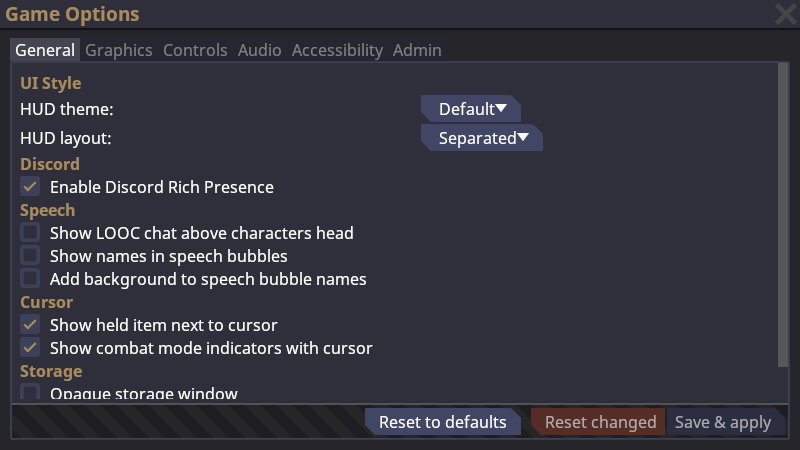
Controls are defined as classes in C# code. All controls extend another control class - at the most base level, a control may inherit from Control, the most bare-minimum representation of a UI control. OptionsMenu is an example of a control defined with Robust XAML - it has a OptionsMenu.xaml.cs and an OptionsMenu.xaml file, both found at Content.Client/Options/UI/.
- C#
- XAML
// Content.Client/Options/UI/OptionsMenu.xaml.cs
namespace Content.Client.Options.UI;

[GenerateTypedNameReferences]
public sealed partial class OptionsMenu : DefaultWindow
<!-- Content.Client/Options/UI/OptionsMenu.xaml -->
<DefaultWindow xmlns="https://spacestation14.io"
            xmlns:tabs="clr-namespace:Content.Client.Options.UI.Tabs"
            Title="{Loc 'ui-options-title'}"
            MinSize="800 450">
    <TabContainer Name="Tabs" Access="Public">
        <tabs:MiscTab Name="MiscTab" />
        <tabs:GraphicsTab Name="GraphicsTab" />
        <tabs:KeyRebindTab Name="KeyRebindTab" />
        <tabs:AudioTab Name="AudioTab" />
        <tabs:AccessibilityTab Name="AccessibilityTab" />
        <tabs:AdminOptionsTab Name="AdminOptionsTab" />
    </TabContainer>
</DefaultWindow>
XAML
XAML stands for Extensible Application Markup Language - it's the language we use to describe the basic structure and properties of a UI control in Robust Toolbox. You may be familiar with HTML, the language used to define the structure of webpages, which are then stylized using CSS stylesheets and given functionality via Javascript, PHP, or other programming languages. XAML, and Robust XAML, takes on a similar structure.
XAML markup is defined as elements, defined by tags enclosed in angle brackets (<>). The closing tag must have a / after the opening (<) bracket. Whitespace doesn't matter - you can use line breaks, indentation, and spacing to visually organize the code of these elements.
Elements may be declared as a single, self-closing tag by ending it in />, for elements that do not contain other elements.
<BoxContainer>
    <Control />
</BoxContainer>
XAML elements may have attributes, defined in the opening tag as an attribute name that equals (=) some value. In Robust XAML, XAML attributes are used to modify the value of fields.
<BoxContainer Name="MyContainer" Orientation="Horizontal" />
Top-level XAML elements (that is: the XAML element that contains all other elements in the XAML file) have a special type of attribute known as a namespace. These are defined in the xmlns property, or xmlns:[name] if you want to add additional namespaces, such as the OptionsMenu above:
<DefaultWindow xmlns="https://spacestation14.io"
    xmlns:tabs="clr-namespace:Content.Client.Options.UI.Tabs"
    Title="{Loc 'ui-options-title'}"
    MinSize="800 450" />
All Space Station 14 Robust XAML controls need to have a namespace of xmlns="https://spacestation14.io". If you define additional namespaces, controls from those namespaces can be used by prefixing it with the namespace ID behind a colon (:):
<tabs:GraphicsTab />
Finally, comments can be defined with <!-- -->:
<!-- This is a XML comment! -->
Making a Robust XAML control
All UI work is done in the Content.Client directory. All controls can technically be defined in pure C#, but as mentioned, this is against convention for new UI work - so let's try defining a new Robust XAML control.
Here is a bare-minimum example of a UI control - for the sake of example, this is found at Content.Client/_MACRO/Test/UI/.
- C#
- XAML
// Content.Client/_MACRO/Test/UI/NewControl.xaml.cs
using Robust.Client.AutoGenerated;
using Robust.Client.UserInterface.Controls;
using Robust.Client.UserInterface.XAML;

namespace Content.Client._MACRO.Test.UI;

public sealed partial class NewControl : Label
{
    public NewControl()
    {
        RobustXamlLoader.Load(this);
    }
}
<!-- Content.Client/_MACRO/Test/UI/NewControl.xaml -->
<Label xmlns="https://spacestation14.io"
    Text="Hello World!" />
Our features of note here:
- In the XAML file, we are using the
xmlns="https://spacestation14.io"namespace. This is required. - The namespace of
NewControlmust match the directory path that it is found in. NewControlextends theLabelUI control. This must match the top-level control of the XAML file.NewControlmust have a constructor with empty parameters (public NewControl()) if you would like to use it in other.xamlfiles, as Robust XAML does not allow you to initiate controls with parameters.NewControlmust callRobustXamlLoader.Load(this);to pull XAML data from its accompanying.xamlfile.
This class doesn't have to be partial (for now), but it's highly recommended to make it partial anyway, as this makes UI work on downstreams easier and also allows you to use [GenerateTypedNameReferences].
Named Controls
All controls support a Name field, which can be used in C# logic with the [GenerateTypedNameReferences] to reference that control. Imagine that all named controls are assigned to fields implicitly. Controls with the [GenerateTypedNameReferences] attribute must be partial.
For example:
- C#
- XAML
using Robust.Client.AutoGenerated;
using Robust.Client.UserInterface.Controls;
using Robust.Client.UserInterface.XAML;

namespace Content.Client._MACRO.Test.UI;

[GenerateTypedNameReferences]
public sealed partial class NewControl : BoxContainer
{
    public NewControl()
    {
        RobustXamlLoader.Load(this);

        // TitleLabel is derived from Name="TitleLabel"
        TitleLabel.Text = Loc.GetString("ui-new-control-title");
    }
}
<BoxContainer xmlns="https://spacestation14.io">
    <Label Name="TitleLabel" />
</BoxContainer>
You can populate label values with localized strings without using C#, as so:
<Label Name="TitleLabel" Text="{Loc ui-new-control-title}" />
However, this does not support parameters.
These named controls are effectively "private" to the control class unless modified by the Access field.
// This would not work unless TitleLabel was Public!
var myControl = new NewControl();
myControl.TitleLabel.Text = "Foo";
<Label Name="TitleLabel" Access="Public" />
These are all of the possible access levels of a child control:
public enum AccessLevel
{
    Public,
    Protected,
    Internal,
    ProtectedInternal,
    Private,
    PrivateProtected,
}
These can be found at RobustToolbox/Robust.Client/UserInterface/ControlPropertyAccess.cs.
I personally do not like using Access modifiers on Robust XAML controls - I generally prefer using set/get methods or encapsulation to modify specific parameters, like so:
public void SetTitleText(string text)
{
    TitleLabel.Text = text;
}
This way, external classes have limited access to the properties of TitleLabel.
Adding logic to controls
Let's say you have a control with some buttons and inputs, or you want to allow a control to be used by UI code to process logic. How do we do that?
For the sake of example, we will use a new control called Counter. It will keep track of the number of times a button has been clicked, and it can be reset to bring the counter back to its starting value.
- C#
- XAML
[GenerateTypedNameReferences]
public sealed partial class Counter : BoxContainer
{
    /// <summary>
    ///     The starting value of this counter. The counter will reset to this value
    ///     when the "Reset" button is pressed.
    /// </summary>
    public int StartingValue = 0;

    /// <summary>
    ///     The current value of this counter.
    /// </summary>
    public int Value = 0;

    public Counter()
    {
        RobustXamlLoader.Load(this);
        // We will populate the rest of this in a second!
    }
}
<BoxContainer xmlns="https://spacestation14.io"
              Orientation="Horizontal"
              SeparationOverride="5">
    <Label Name="CounterLabel" />
    <Button Name="IncreaseCounterButton" Text="{Loc counter-increase-button}" />
    <Button Name="ResetCounterButton" Text="{Loc counter-reset-button}" />
</BoxContainer>
Controls can define events that can then be subscribed to by other UI code, like so:
public event Action<int>? CounterUpdated;
UI events must be nullable. Action<int> means that this event will pass an int as a parameter to callback functions - you can use other types here, or you can simply define it as Action to have no parameters at all.
To use this event, we can Invoke() it in our UI code.
// The "?" here indicates nullability.
// Nothing will happen if nothing is subscribed to the event.
CounterUpdated?.Invoke(Value);
Then, another control that wants to subscribe to counter updates can add a callback:
public NewControl()
{
    _sawmill = Logger.GetSawmill("newControl");

    var counter = new Counter();
    counter.CounterUpdated += OnCounterUpdated;
}

private void OnCounterUpdated(int value)
{
    _sawmill.Debug($"New value for {MyCounter}: {value}");
}
Basic Robust Toolbox controls, such as buttons and other inputs, also have events. For example, in our Counter code, we can add callbacks to IncreaseCounterButton.OnPressed and ResetCounterButton.OnPressed in order to update our control accordingly.
Working Counter Example
Here is a full example of a working counter that can be increased and reset:
- C#
- XAML
[GenerateTypedNameReferences]
public sealed partial class Counter : BoxContainer
{
    /// <summary>
    ///     Event fired when this counter's value is updated via player input.
    /// </summary>
    public event Action<int>? CounterUpdated;

    /// <summary>
    ///     The starting value of this counter. The counter will reset to this value
    ///     when the "Reset" button is pressed.
    /// </summary>
    public int StartingValue = 0;

    /// <summary>
    ///     The current value of this counter.
    /// </summary>
    public int Value = 0;

    public Counter()
    {
        RobustXamlLoader.Load(this);
        UpdateLabel();

        IncreaseCounterButton.OnPressed += (_) => { IncreaseCounter(); };
        ResetCounterButton.OnPressed += (_) => { ResetCounter(); };
    }

    /// <summary>
    ///     Increases the counter's <see cref="Value" /> by 1.
    /// </summary>
    private void IncreaseCounter()
    {
        Value++;
        CounterUpdated?.Invoke(Value);
        UpdateLabel();
    }

    /// <summary>
    ///     Resets the counter to <see cref="StartingValue" />.
    /// </summary>
    private void ResetCounter()
    {
        Value = StartingValue;
        CounterUpdated?.Invoke(Value);
        UpdateLabel();
    }

    /// <summary>
    ///     Update the counter's label to reflect the value of the counter..
    /// </summary>
    private void UpdateLabel()
    {
        CounterLabel.Text = Value.ToString();
    }
}
<BoxContainer xmlns="https://spacestation14.io"
              Orientation="Horizontal"
              SeparationOverride="5">
    <Label Name="CounterLabel" />
    <Button Name="IncreaseCounterButton" Text="{Loc counter-increase-button}" />
    <Button Name="ResetCounterButton" Text="{Loc counter-reset-button}" />
</BoxContainer>
Then, say, if you wanted to use this control inside another control (assuming it's at the namespace Content.Client._MACRO.Test.UI):
<DefaultWindow
    xmlns="https://spacestation14.io"
    xmlns:test="clr-namespace:Content.Client._MACRO.Test.UI">
    <test:Counter Name="MyCounter" />
</DefaultWindow>
